Opera AI
Free AI assistant built into Opera One, Opera GX and Opera Air, formerly Aria, that works with your open tabs.
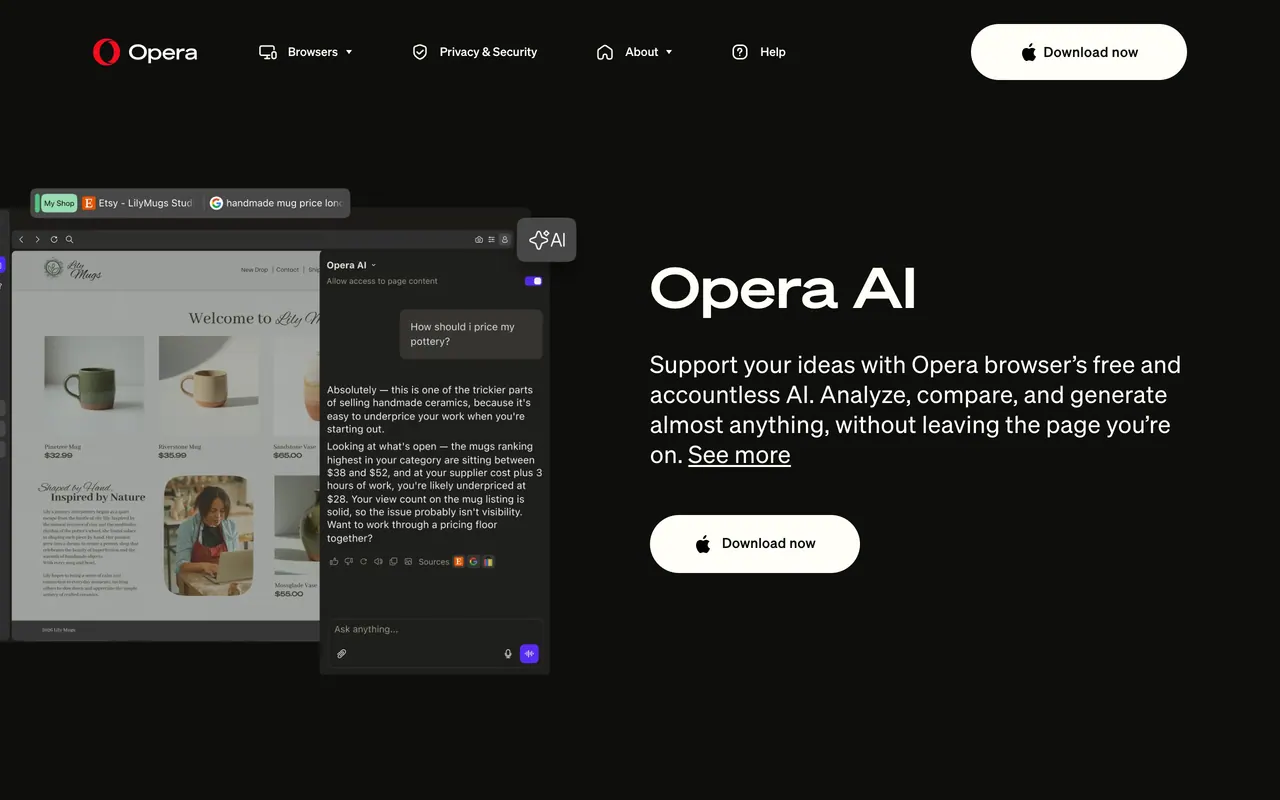
Opera AI is the AI assistant in Opera's desktop browsers Opera One, Opera GX and Opera Air, a rebuilt replacement for Aria that answers in a side panel using the page or Tab Island you have open. Opera says it is free and needs no log-in or sign-up.
About Opera AI
Opera's blog says Opera AI took the place of Aria as a completely rebuilt browser AI, now available to all users of Opera One, Opera GX and Opera Air, and the Opera AI page calls it 'Opera AI (previously Aria AI)'. You open it with the Ask AI button in the top-right corner of the browser or with Ctrl + O on Windows and Cmd + O on macOS, and it answers in a side panel instead of on top of the page.
It uses the page you are viewing or every tab in the same Tab Island, so it can summarize and compare pages and find reviews or missing pieces with links to sources. It also analyzes uploaded images and files such as PDFs, spreadsheets, documents, audio and video, summarizes, translates or searches YouTube videos through their transcripts, and generates images, including desktop and mobile wallpapers. Voice input and read-aloud answers are built in.
Highlighting text on any webpage offers Explore more for an AI explanation or Translate, which covers 50 languages. The Opera AI page says it gives free immediate access to the best models from OpenAI and Google in one place. Opera's blog says the agentic engine behind it was adopted from Opera Neon and rebuilt for speed.
Sources: opera.com/features/opera-ai and blogs.opera.com/news/2025/12/opera-ai-comes-to-opera-one-opera-gx-opera-air, read 2026-10-27
Opera AI pros and cons
Pros
- Short prompts can be enough, because Opera AI answers from the page or tab group you are in.
- Opera's blog says it reads only the page you are on or its Tab Island and does not send your general browsing activity or history to its AI engine.
- Opera AI as a whole, its toolbar button or its prompts on highlighted text can each be turned off in Settings or Easy Setup.
Cons
- Page access is on by default: Opera's blog says it is enabled automatically when you start a new chat on a website, and the page content reaches Opera AI once you write with it on, unless you switch it off at the top of the chat first.
- Opera's Opera AI page and its launch post describe no browser extension or standalone app; it comes with Opera One, Opera GX and Opera Air.
Tagged
- Supports GPT
- Web-based
- Free
Opera AI alternatives
The closest alternatives to Opera AI.
- 01Free →Comet
Perplexity's Chromium-based AI browser with Perplexity search and an assistant that works on open web pages.
- 02Freemium →Dia
The Browser Company's AI-first browser successor to Arc with chat baked into every action.
- 03→Sider
AI sidebar and browser agent for Chrome and Edge that chats about pages, automates web tasks and edits sites.
Related reading
Featured on Vibedonalds
Own Opera AI? Add this badge to your site to show you’re listed — and link back to your profile here.

<a href="https://vibedonalds.com/tools/opera-ai" target="_blank" rel="noopener">
  <img src="https://vibedonalds.com/badge/featured-on-vibedonalds.svg" alt="Opera AI — Featured on Vibedonalds" width="240" height="60" loading="lazy" />
</a>Frequently asked questions
- What is Opera AI?
- Opera AI is a free AI assistant built into Opera One, Opera GX and Opera Air, formerly Aria, that works with your open tabs.
- Is Opera AI free?
- Opera AI is free to use. There is no paid tier as of the last index update.
- What platforms does Opera AI support?
- Opera AI's own site lists it for macOS and Windows.
- What are the alternatives to Opera AI?
- The closest alternatives to Opera AI are Comet, Dia, Sider.
- What are the downsides of Opera AI?
- Page access is on by default: Opera's blog says it is enabled automatically when you start a new chat on a website, and the page content reaches Opera AI once you write with it on, unless you switch it off at the top of the chat first. Opera's Opera AI page and its launch post describe no browser extension or standalone app; it comes with Opera One, Opera GX and Opera Air.
- What happened to Opera Aria?
- Opera replaced it with Opera AI. Its blog says Opera AI took the place of Aria as a completely rebuilt browser AI, free and accountless, for all users of Opera One, Opera GX and Opera Air, and the Opera AI page calls it 'Opera AI (previously Aria AI)'.
- Is Opera AI free?
- Yes: Opera says you get full AI support for free with no log-in or sign-up, and that its AI Image Generator creates images for free.
- How do I open Opera AI?
- Click the Ask AI button in the top-right corner of the Opera browser, or press Ctrl + O on Windows or Cmd + O on macOS. It opens in a side panel, where you can ask about the page you are viewing or all tabs in the same Tab Island.
- Which AI models does Opera AI use?
- Opera's page promises free immediate access to the best models from OpenAI and Google in one place, and its blog adds that the agentic engine behind Opera AI was adopted from Opera Neon and rebuilt for speed.
- Does Opera AI read my browsing history?
- Opera's blog says no: Opera AI uses only the page you are on or its Tab Island and does not send your general browsing activity or history to its AI engine. Page access is enabled automatically in a new chat on a website, and you can turn it off at the top of the chat before writing.