CC
Google Labs agent for families that turns the emails members share into a daily brief, calendar and tasks.
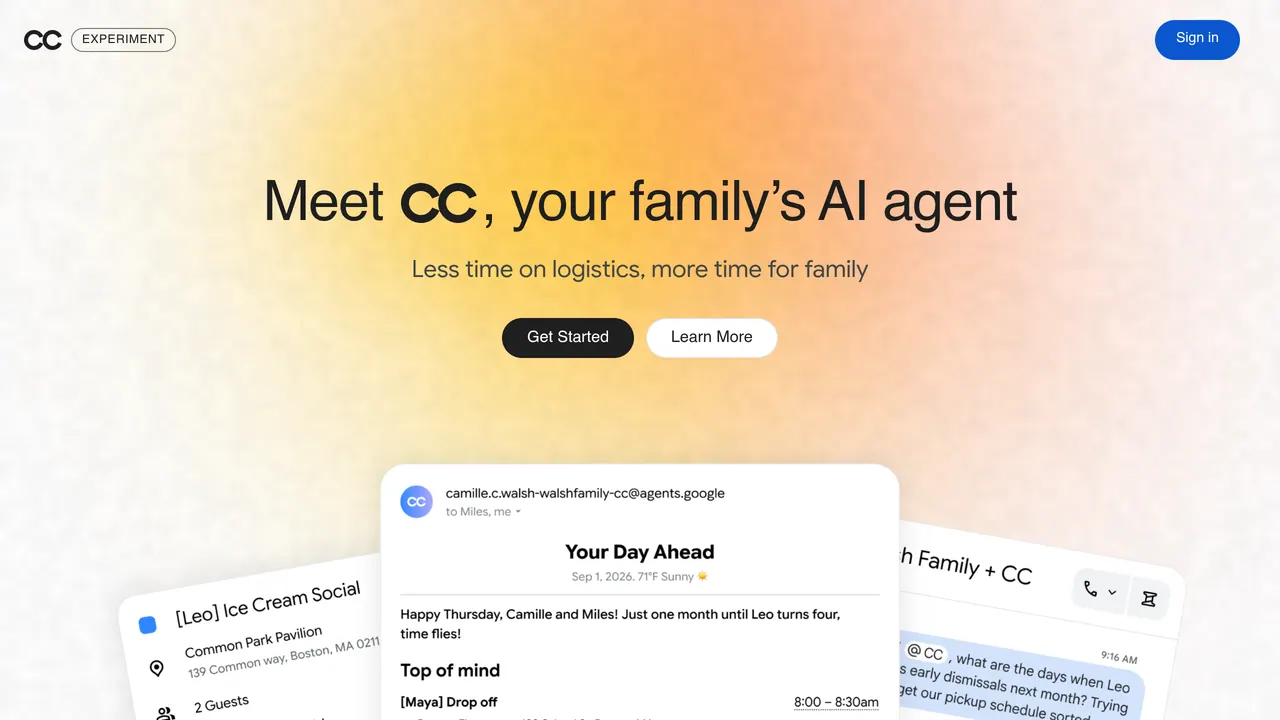
CC is an experimental Google Labs agent for families: members choose which email senders it may read, and it sends a morning brief, keeps a shared calendar and task list and pre-fills forms. New users 18+ in the U.S. with a personal Google account join a waitlist; Google's pages list no price.
About CC
CC works from its own Google account and email address and reads only emails from senders a member picks in Sharing Preferences, or emails sent to it directly. Each morning it sends the group a 'Your Day Ahead' email with upcoming events, to-dos and logistics; it adds events it finds to a shared CC Calendar with what to bring, where to go and when to arrive, and puts to-dos such as forms, appointments and RSVPs on a shared CC Tasks list.
Members can message CC in a shared Google Chat space or send it a photo of an invite or practice schedule to update the calendar. It creates Google Docs and Sheets such as meal plans, packing lists and budgets, pre-fills fillable PDF forms for your review and sends reminders in Chat. Google says every CC runs on its own isolated cloud computer with its Antigravity harness and the latest Gemini models, and its shared memory keeps what applies to the household apart from what belongs to one person.
CC cannot make purchases, enter card details, sign waivers or submit forms on its own, and it will not send a file outside the group without a member's approval. It handles PDFs, images and plain text, but not password-protected PDFs, video or audio. Google calls it a standalone Labs service, not part of Gemini Apps or Google Workspace.
Google first launched CC on Dec 16, 2025 as a personal agent with a daily briefing, and later brought it to the Gemini app as Daily Brief. On September 17, 2026 it made CC an agent for families and households with up to six members, on web and mobile for people 18+ in the U.S. with a personal Google account. Earlier users get an invite to upgrade, in waves; in Canada, Australia and New Zealand existing users keep CC as it is, and the waitlist opens when CC becomes available there.
Sources: labs.google.com/cc/landing, blog.google/innovation-and-ai/models-and-research/google-labs/cc-expanding-to-groups, blog.google/innovation-and-ai/models-and-research/google-labs/cc-ai-agent and labs.google, read 2026-10-27
CC pros and cons
Pros
- Each member decides which senders CC may read, down to single senders, and CC does not expose anyone's whole inbox to the group.
- A morning email, a shared calendar, a Chat space and a shared task list give the whole household the same view of the day.
- It takes on chores such as filling out registration PDFs, writing meal plans and shopping lists, and checking live drive times through the Google Maps API.
- It works from its own account, so it never logs into or searches members' personal inboxes.
Cons
- New users must be 18+, be in the U.S. and join a waitlist, and upgrades for earlier users open in waves.
- A member cannot be removed after accepting the invite; changing the group means deleting it along with its agent, calendar, chat space and task lists.
- Setup asks you to turn on Google's smart features in Gmail settings, and deleting an email in Gmail does not remove it from CC's memory.
Tagged
- Agentic Mode
CC alternatives
The closest alternatives to CC.
Related reading
Featured on Vibedonalds
Own CC? Add this badge to your site to show you’re listed — and link back to your profile here.

<a href="https://vibedonalds.com/tools/cc" target="_blank" rel="noopener nofollow">
  <img src="https://vibedonalds.com/badge/featured-on-vibedonalds.svg" alt="CC — Featured on Vibedonalds" width="240" height="60" loading="lazy" />
</a>Frequently asked questions
- What is CC?
- CC — Google Labs agent for families that turns the emails members share into a daily brief, calendar and tasks.
- What are the alternatives to CC?
- The closest alternatives to CC are Gemini Task, Saner.AI.
- What are the downsides of CC?
- New users must be 18+, be in the U.S. and join a waitlist, and upgrades for earlier users open in waves. A member cannot be removed after accepting the invite; changing the group means deleting it along with its agent, calendar, chat space and task lists. Setup asks you to turn on Google's smart features in Gmail settings, and deleting an email in Gmail does not remove it from CC's memory.
- Is CC free?
- Google's CC page and its September 2026 announcement list no price. When CC first launched on Dec 16, 2025, early access started with Google AI Ultra and paid subscribers in the U.S. and Canada.
- Who can use CC?
- People 18 or older with a personal Google Account. The family version is available in the U.S., where new users join a waitlist; the Group Manager invites members by their personal Gmail address, and every member must be 18 or older.
- What can CC see in my email?
- Only what each member chooses to share. CC reads emails from senders picked in Sharing Preferences and emails sent to its own address; it cannot log into or search personal inboxes, and it does not read your primary calendar unless you add CC to it.
- How many people can share one CC?
- Google's announcement says up to six members can manage and collaborate with the agent. Members cannot be removed one by one after they accept the invite; deleting the group removes its agent and shared spaces but keeps everyone's CC account.
- Is CC part of Gemini or Google Workspace?
- No: Google calls CC a standalone experimental service from Google Labs, and says the Workspace Labs Privacy Notice and the Gemini Apps Privacy Notice do not apply. Your data is processed under the Google Privacy Policy.