Kai
AI executive assistant from Morgen for email, meetings, tasks and calendar, also reachable over MCP.
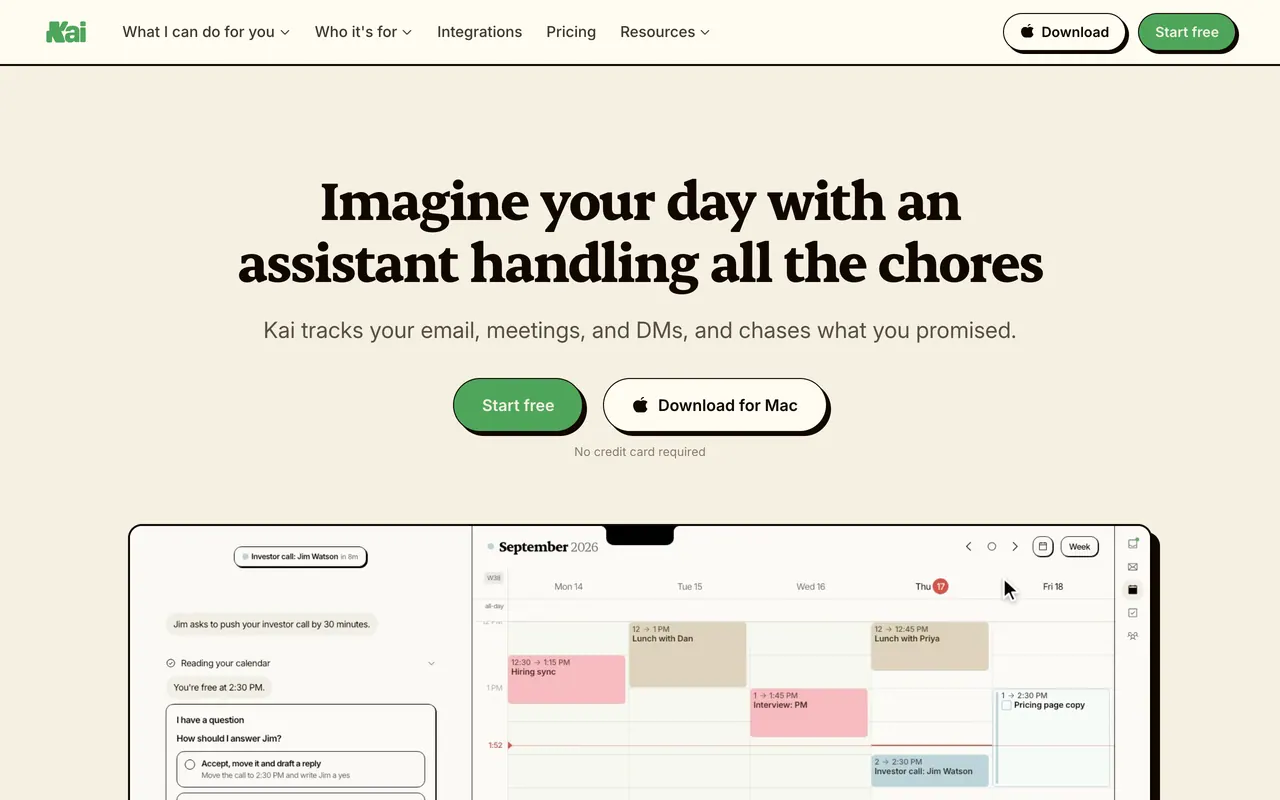
Kai, from the team behind the Morgen calendar app, is an AI executive assistant that sorts Gmail and Outlook inboxes, drafts replies in your voice, records calls without a bot and turns what was agreed into tasks, sending nothing without your approval. After a one-time free trial, Base is $20 a month per user, billed monthly.
About Kai
Kai reads new mail in your connected Gmail and Outlook accounts, several per provider if you like, and sorts each thread into Needs Reply, FYI, Waiting Reply or Done. Before drafting, it looks at how you have written to that person, and it suggests a task when a thread asks something of you; drafts, tasks and calendar changes wait for your approval. When an email can't wait, Kai writes to you in its chat and you get a notification.
Kai captures Zoom, Google Meet, Microsoft Teams and Webex calls and Slack huddles from your device, with no bot in the participant list, and you start every recording yourself. It briefs you before meetings, then writes a summary and action items that become tasks linked to their source in one ranked list. Google and Outlook calendars share one grid, where Kai can block focus time or move events when you ask, and a booking page reads free/busy across them.
Workflows run on a schedule you set, such as each morning or every Friday, and send you the result. Kai's MCP server lets Claude, ChatGPT, Gemini, Cursor, Claude Code and VS Code read your calendar, email, tasks and meeting notes and act when you ask, after one approval on Kai's own screen. Kai has no REST API for account data; everything that touches your account goes through that MCP server.
All plans include every feature and differ in usage: billed monthly per user, Base is $20, Pro $50 with 5x Base's monthly usage and Ultra $100 with 10x, and teams pay the same per seat, with prorated seats. There is no overage, and Kai tells you in the app when you are close to your allowance. Kai runs in any browser, as a Mac app for Apple silicon and Intel, and on Android and iPhone.
Sources: hirekai.ai, /pricing, /integrations, /developers, /kai-mcp, /email-mcp, /hire and /hire/mobile, read 2026-10-27
Kai pros and cons
Pros
- The free trial needs no credit card and has no time limit, and nothing is charged automatically when it runs out.
- Kai says content sent to its AI providers is never used to train AI models, its own or theirs.
- The MCP connector costs nothing extra with a Kai account and is listed in Claude's connector directory.
- You can revoke any connected account instantly, and your Gmail, Outlook and calendar data stays untouched.
Cons
- Only Google and Microsoft accounts connect: there is no iCloud, Proton Mail or IMAP support, and other calendar providers aren't supported yet.
- Tasks live only in Kai, which doesn't sync with external task tools such as Todoist or TickTick.
- The iPhone app installs through TestFlight, with no App Store listing yet.
- There is no free plan: when the trial allowance is used up, Kai stops taking on new work until you pick a plan.
Tagged
- Agentic Mode
Kai alternatives
The closest alternatives to Kai.
- 01Freemium →Granola
Bot-free AI notepad for meetings that turns your device audio and jottings into notes, on desktop and mobile.
- 02Freemium →Otter.ai
AI meeting notetaker that joins Zoom, Teams and Meet or records bot-free, with live transcripts and AI Chat.
- 03Freemium →Shortwave
AI email client for Gmail and Google Workspace with an agent that searches, sorts and writes in your voice.
Related reading
Featured on Vibedonalds
Own Kai? Add this badge to your site to show you’re listed — and link back to your profile here.

<a href="https://vibedonalds.com/tools/kai" target="_blank" rel="noopener">
  <img src="https://vibedonalds.com/badge/featured-on-vibedonalds.svg" alt="Kai — Featured on Vibedonalds" width="240" height="60" loading="lazy" />
</a>Frequently asked questions
- What is Kai?
- Kai is an AI executive assistant from Morgen for email, meetings, tasks and calendar, also reachable over MCP.
- Is Kai free?
- Kai is a paid product. Pricing details are on the official site.
- What platforms does Kai support?
- Kai's own site lists it for Web, macOS, iOS and Android.
- What are the alternatives to Kai?
- The closest alternatives to Kai are Granola, Otter.ai, Shortwave.
- What are the downsides of Kai?
- Only Google and Microsoft accounts connect: there is no iCloud, Proton Mail or IMAP support, and other calendar providers aren't supported yet. Tasks live only in Kai, which doesn't sync with external task tools such as Todoist or TickTick. The iPhone app installs through TestFlight, with no App Store listing yet. There is no free plan: when the trial allowance is used up, Kai stops taking on new work until you pick a plan.
- How much does Kai cost?
- Kai starts with a free trial, then three plans billed monthly: Base at $20, Pro at $50 and Ultra at $100 per user per month. All include every feature; Pro has 5x Base's monthly usage and Ultra 10x. Teams pay the same per seat, and there is no overage.
- Is there a free plan?
- Kai offers a free trial instead of a free plan: a one-time allowance with every feature, no time limit and no credit card. When it is used up, you pick a plan to keep going.
- Does a bot join my meetings?
- Kai captures the call audio on your device for Zoom, Google Meet, Microsoft Teams, Webex and Slack huddles, so no bot appears in the participant list. You start every recording yourself, and the audio goes to a speech-to-text provider's EU service to become text.
- Can I use Kai from Claude or ChatGPT?
- Yes: Kai's MCP server lets Claude, ChatGPT, Gemini, Cursor, Claude Code and VS Code read and act on your Kai calendar, email, tasks and meetings after one approval. Claude lists Kai in its connector directory; ChatGPT needs developer mode switched on, and Gemini is limited to the United States on Google AI Pro or Ultra.
- Which platforms does Kai run on?
- Kai has a web app that runs in any browser, a Mac app built for macOS on Apple silicon and Intel, and phone apps: Android from Google Play and iPhone through TestFlight, which has no App Store listing yet.